


As soon as I got first two ham radio rigs, I needed to connect them both to PC, to program memories or use CAT control from logging software. I realized that it is impractical to have as many USB to RS323 adapters as rigs.
As serial connection for radio requires just RX, TX and GND lines, and it is the same for most of modern radio stations. It is actually only radio connector that is different – signaling is the same.
It showed up quite easy to build simple multirig adapter. All you need to do is to use existing USB to serial interface adapter, cut it’s cable in two and insert male and female three pin 3.5 mm jack (commonly used as stereo audio connectors).
Female jack, as less common, should be set on USB interface side and male for various cable adapters set for each rig.
Here is schematics of an interface with adapters:
- combined 6 pin connector I used for Kenwood, Baofeng, Zonton, Wouxun and other compatible radios
- 8 pin mini din male for Yaesu radios
- 6 pin mini din male for Yaesu and Icom CIV‑I interface radios
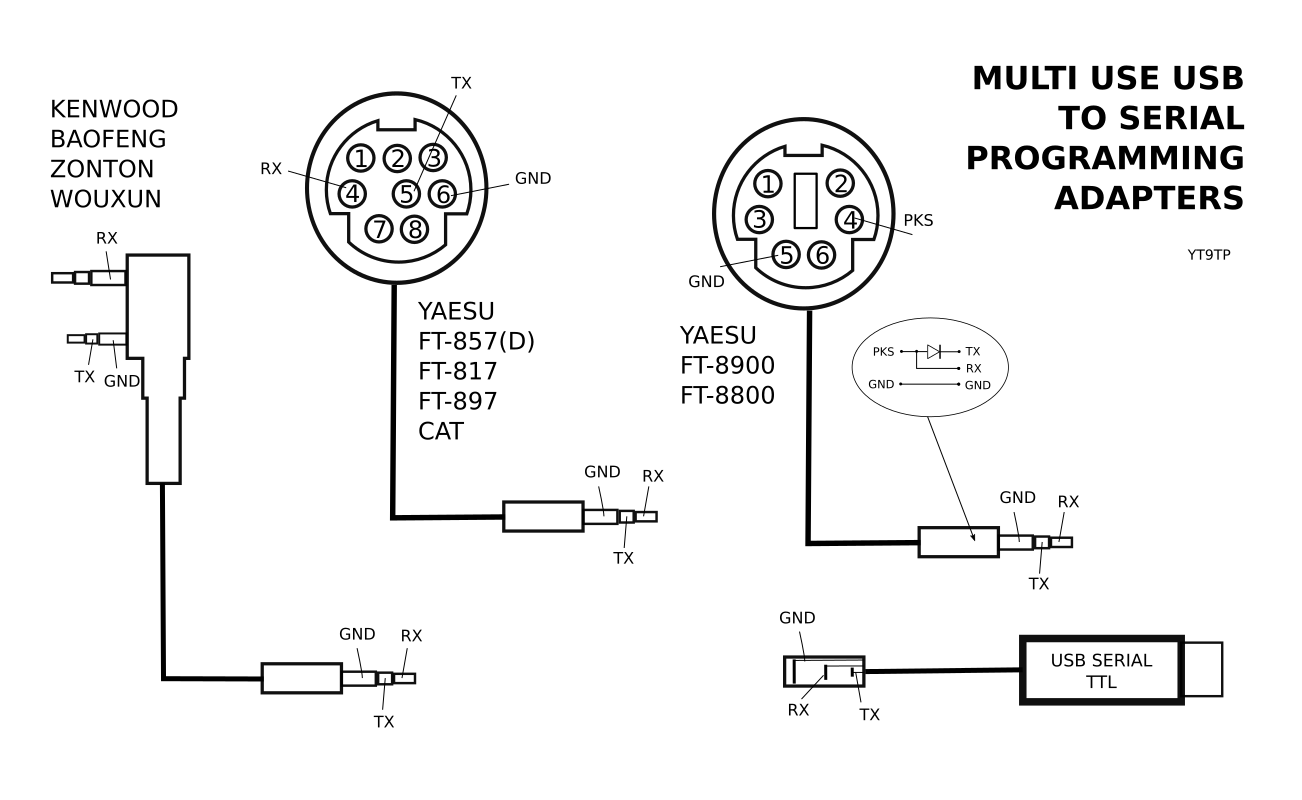
This allowed me not just to easily connect my radios to PC, but also radios of my friends. So far I used this for Yaesu FT857, Yaesu FT-857D, Yaesu FT-897, Yaesu FT-817, Kenwood TK-250, Baofeng UV-B5, UV-B6, Zonton 999, Wouxun KG-UV6D and others.
And yet, if new rig shows up all I have to do is to create adapter for it – interface stays the same. I have collected pinout info abut number of other radios but I will post here updates only as I try them out.
What USB to Serial Interface to Use
Almost any will do. The most important point is to use interface with TTL levels for RS232 as most modern rigs use TTL not RS232C levels. These are actually cheaper as they lack additional TTL to RS232C conversion. You may buy such adapter for few bucks. If you get one with RS232C levels then you have to make additional interface to convert that to TTL (by using MAX232 chip or transistors).
Avoid Prolific chipset adapters. They actually work fine, but usually not straightforward to use. Reason is that market is overwhelmed with Prolific clones (which are very cheap). Those clones work fine, but Prolific decided to protect itself by issuing drivers that do recognize clone chips and do not work with them. That means, you have to play a bit with older drivers to make them work. Although I understand Prolific point I think they shot themselves in the foot. As the only way for ordinary buyer to recognize clone from original chip is to buy and check if the newest drivers work, people simply avoid hassle and turn to other brands.
Note About the CIV‑I Interface
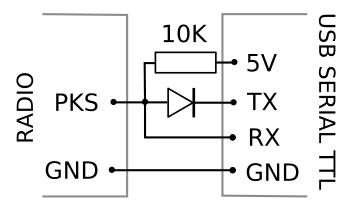 FT-8900 and FT-8800 and some other Yaesu radios use two wire interface. One wire is ground and other is both RX and TX. This is also known as CIV‑I interface used in Icom radios.
CIV‑I interface is quite simple. There is a diode (universal like 1N14148) connecting RX and TX, oriented cathode toward TX, with one 10K pull up resistor to 5V on RX.
However, I found out that YAESU FT-8900 already provides pull up voltage on PKS line, so, there is no need for 10K pull up resistor. Single diode connecting RX and TX is enough. That allowed me to make simple adapter that connects to my universal interface that provides only RX, TX and GND. Diode fits within 3.5 mm connector.
If you do not have mini din 6 pin connector, you may use cable salvaged from old PS/2 mouse (one with green PS/2 connector). Use non isolated wire as ground (it is connected to metallic shield of the connector not actual GND pin but it does not matter as on radio GND pin is connected to the shield) and red wire for PKS signal.